CLPLWE01 – Pipe Clip (LoRaWAN)
Product Description
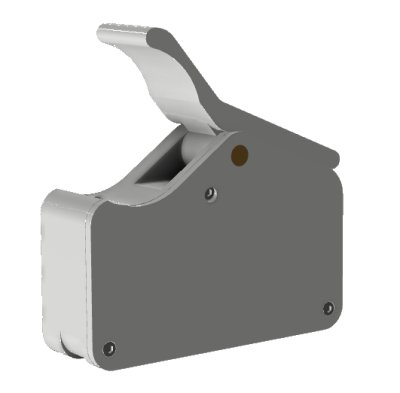
Identical device to the CLPWIE01, but shipped in LoRaWAN standard mode. The Smart Pipe Clip is a compact clamp for water pipes with an outer diameter of 15–32 mm (all materials). Three main functions:
- Frost Warning: Detection and warning of frost risk
- Water Consumption Estimation: Estimation of water consumption using vibration and temperature sensors
- Leak Detection: Detection of water leaks through unusual water usage
Communication: Wi-Fi, LoRa Direct (direct motor control), or LoRaWAN (default for CLPLWE01). Can be switched to Wi-Fi via button menu. Power supply: 2×AAA batteries or external 3V DC.
For the complete manual (construction, installation, operation, technical data), see CLPWIE01.
Sensor Construction
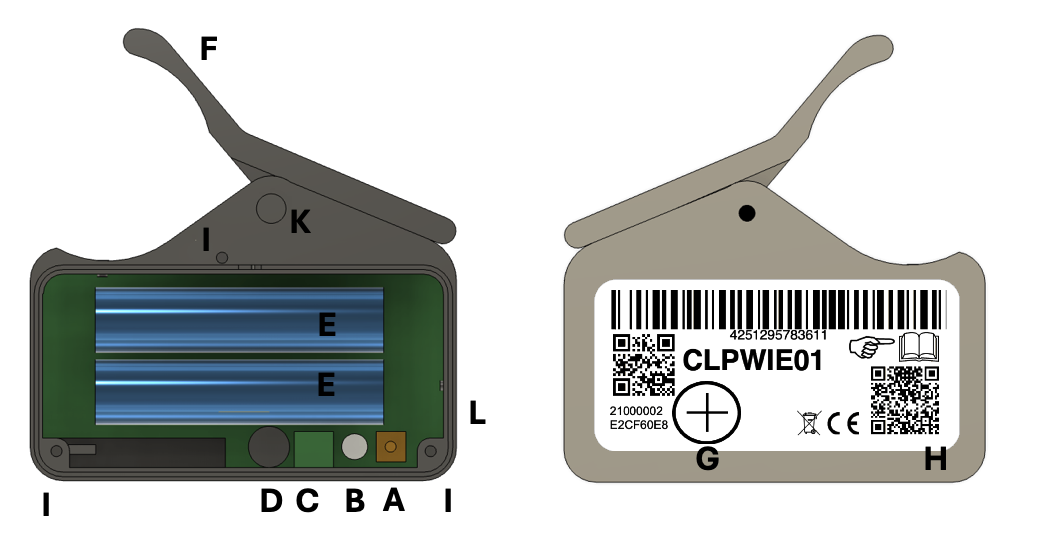
| Letter | Component | Description |
|---|---|---|
| A | Button | For pairing, testing, and menu access (under the battery compartment cover) |
| B | LED (dual-color) | Shows network connection, menu status, and pairing mode |
| C | Screw Terminal | Connection for external 3V power supply (+ and − marked) |
| D | Buzzer | Audible signals |
| E | Battery Compartment | 2×AAA batteries |
| F | Movable Clamp | For quick attachment to the water pipe |
| G | Transport Safety Magnet | Activates/deactivates the sensor |
| H | Red LED | Alarm indicator and active radio communication |
| I | Screws | 3 screws to open the battery compartment |
| K | Clamp Axis | Removable for cable tie mounting |
| L | Air Temperature Sensor | Measures ambient temperature (point toward center of room) |
Installation and Commissioning
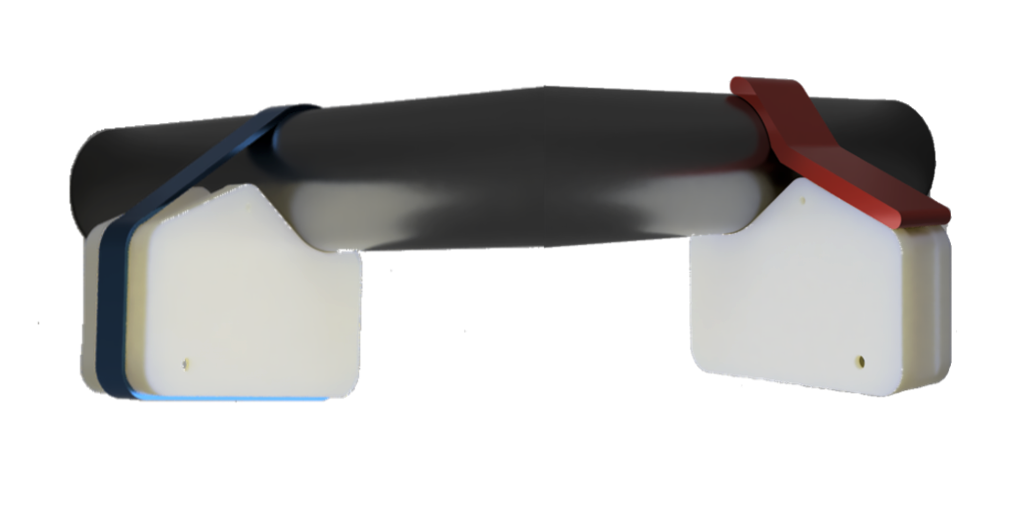
Attachment Method 1: Quick Mount with Clamp
The movable clamp (F) can attach the device directly to the water pipe. This method allows quick mounting and easy removal or relocation without tools.
Attachment Method 2: Permanent Cable Tie Mount
For a tamper-proof, permanent installation:
- Loosen the three screws (I) on the battery compartment cover and remove the cover
- Pull out the clamp axis (K) (by hand or with pliers)
- Remove the clamp and spring
- Thread a cable tie through the designated recess in the housing
- Secure the sensor to the pipe
Placement
- Mount on the main water line, approx. 20–40 cm from the building water inlet
- Air temperature sensor (L) should face toward the center of the room (not toward the wall)
Activation and Deactivation
The round transport safety magnet (G) controls the operating state:
- Magnet on the marking field (large plus sign): Sensor in sleep mode, no battery consumption
- Remove magnet: Sensor activates – the red LED (H) blinks inside the housing (may take up to 1 minute)
- Replace magnet: Sensor deactivates
LoRaWAN Communication
See LoRaWAN Connection for setup and the complete Daisychain Protocol.
Detailed LoRaWAN specification for this device: Online Manual
Device Registration
For registration with the LoRaWAN network operator (e.g., The Things Network or commercial operators), three keys are required:
- Dev EUI (public): 16-digit code on the inside of the battery compartment cover and the packaging (as QR code and text string)
- Join EUI (public, identical for all Aqua-Scope devices):
49 43 48 54 48 59 20 21 - Join Key (secret): Sent via email, request at https://aqua-scope.com/lora with valid email address and public key
The web form request works exactly once to prevent misuse.
Connection Setup
After inserting the batteries or connecting an external power supply, the device automatically attempts to connect to the LoRaWAN network. The LEDs blink during the JOIN process (approx. 25 seconds). If the connection fails, the device enters sleep mode. If the sensor loses its connection to the server at any point, it automatically restarts the connection.
LoRaWAN and direct motor control via LoRa are mutually exclusive. In LoRaWAN mode, the sensor cannot directly control Aqua-Scope motors via radio.
Supported Sensor Types
| ID | Sensor | Unit |
|---|---|---|
0x01 | Temperature | 1/10 °C |
0x03 | Operating Time | Hours |
Alarm Types
| ID | Alarm | Value |
|---|---|---|
| 2 | Temperature Too Low | current temperature |
| 3 | Temperature Too High | current temperature |
| 4 | Leak / Drip Alarm | — |
| 5 | Prolonged Water Usage | — |
| 12 | Battery Depleted | — |
Basic Functions
Regular Sensor Data
| Measurement | Description |
|---|---|
| Operating Time | Hours since activation |
| Room Temperature | Measured at the air temperature sensor (L) in °C |
| Battery Status | Voltage and consumed capacity |
| Water Consumption | Estimated in liters |
Alarms
| Alarm | Description | Behavior |
|---|---|---|
| Temperature Too Low | Temperature falls below configurable threshold | Clears automatically when temperature rises above threshold |
| Temperature Too High | Temperature exceeds configurable threshold | Clears automatically when temperature falls below threshold |
| Leak / Drip Alarm | Dripping faucet or small leak detected | Clears automatically when no water flow is detected |
| Prolonged Water Usage | Water flowing unusually long – possible large leak | Clears automatically when water flow stops |
| Battery Depleted | More than 80% of battery capacity consumed | Replace batteries |
Button Controls and LED Signals
The button (A) and dual-color LED (B) are located under the battery compartment cover (loosen 3 screws).
Button Functions
| State | Action | Function |
|---|---|---|
| Factory state (LED blinks red/green) | Short click | Toggle WPS mode |
| Normal operation | Short click | Send test status via radio (green LED confirms) |
| Any | Hold >5 sec | Activate 1-button menu |
1-Button Menu
Hold button for more than 5 seconds → menu starts at command 1 (1x beep, 1x LED blink).
Operation:
- Short click: Advance to next command (2x beep = command 2, etc.). After the last command, counting restarts at 1.
- Long press: Execute the pre-selected command (3x yellow blink as confirmation)
- Timeout: Menu exits automatically after a few seconds of inactivity
Toggleable commands (3–5) switch a parameter (toggle). The LED color shows the current status: red = inactive, green = active.
| No. | Command | Description |
|---|---|---|
| 1 | Link test | Tests radio link quality. Result: 0 flashes = no connection, 1–5 flashes = signal strength (1 = barely sufficient, 5 = excellent) |
| 2 | Factory reset | Resets all parameters, including WLAN SSID and password |
| 3 | Sleep mode | Toggle on/off. In sleep mode, power consumption is reduced; LED and status indication are disabled |
| 4 | LoRaWAN ↔ LoRa Direct | Toggle between LoRaWAN (factory setting on CLPLWE01) and LoRa Direct |
| 5 | LoRa ↔ WLAN | Switch between the current LoRa mode and WLAN. No direct motor control possible in LoRa mode |
| 6 | Manual offset | Manual re-calibration of the vibration sensor to compensate for environmental changes. Do not use while water is flowing through the pipe |
Battery Replacement and External Power Supply
Battery Replacement
- Loosen the three screws (I) on the battery compartment cover
- Remove the cover
- Remove old AAA batteries, insert new ones (observe polarity)
- Screw the cover back on
Standard AAA alkaline or lithium batteries can be used.
External Power Supply
Under the battery compartment cover, there is a screw terminal (C) with + and − markings for an external 3V DC supply (min. 500 mA, not included).
- Break out the small opening (3×5 mm) at the bottom of the housing to route the cables
- Connect the cables to the screw terminal (C) (observe + and −)
The batteries can remain in the device as backup. However, by breaking out the cable opening, the device loses its IP44 protection rating – it is then no longer protected against splash water.
Scope of Delivery
- Main device (Pipe Clip)
- 2×AAA batteries (pre-installed)
- User manual
- Cable tie
Technical Specifications
| Parameter | Value |
|---|---|
| SKU | CLPLWE01 |
| Default Radio | LoRaWAN (switchable to Wi-Fi) |
| Pipe Diameter | 15–32 mm (all materials: copper, steel, PEX, PE, etc.) |
| Wi-Fi | 2.4 GHz, 802.11 b/g |
| Bluetooth | Low Energy |
| LoRaWAN | Class A |
| LoRa Direct | Direct motor control |
| Design Registration | DE 402025200873-0001 |
Sensors
| Sensor | Description |
|---|---|
| 6-axis gyro | Vibration detection (if installed) |
| 3× temperature sensors | Pipe and air temperature |
| Voltage sensor | Battery voltage |
| Reed contact | Magnetic field detection |
| Ruthenium oxide heating element | Water flow detection |
Power Supply and Battery Life
| Parameter | Value |
|---|---|
| Batteries | 2×AAA (standard alkaline or lithium) |
| External Supply | 3V DC, min. 500 mA |
| Idle Current | 0.4 mAh/day |
| LoRaWAN per Transmission | 8 mAs |
| Wi-Fi per Transmission | 300 mAs |
| AAA Battery Capacity | 1000 mAh (effective) |
| Mode | Transmissions/Day | Lifespan |
|---|---|---|
| LoRaWAN | 4 | ~75 months |
| Wi-Fi | 4 | ~45 months |
| Wi-Fi | 24 | ~12 months |
Radio Emissions
| Technology | Frequency | Transmit Power |
|---|---|---|
| Wi-Fi | 2.4 GHz (broadband per EN 300 328) | — |
| LoRaWAN | 868–869 MHz | 4 dBm (2.5 mW) |
Dimensions
| Parameter | Value |
|---|---|
| Protection Rating | IP44 |
| Dimensions | 65 × 20 × 45 mm |
| Weight | 57 g (incl. batteries) |