BUTLWE02 -- LoRa Wall Button (LoRa Direct)
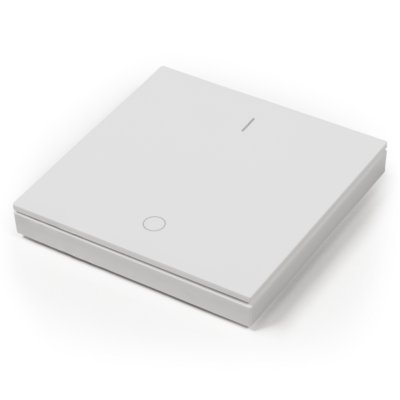
Product Description
The wall button switches an Aqua-Scope motor directly via LoRa radio (868 MHz) and queries the current motor status. The LED indicates the motor switching state: red = closed, green = open. Mount with screws or double-sided adhesive tape on any dry, flat surface. Alternatively, the device can be placed freely. Power supply: CR2032 battery (pre-installed).
The button can also send a control signal to an Aqua-Scope sensor (AQS, AQM, AQX), e.g., to clear an alarm.
LoRa Direct
LoRa Direct enables direct radio communication between Aqua-Scope devices -- no network server, gateway or infrastructure required. Details: LoRa Direct.
This device can therefore only be used for direct communication with other Aqua-Scope devices. The respective devices must be paired with each other, which is done either via the Aqua-Scope App or by pressing buttons.
For every LoRa Direct device, there is also a corresponding LoRaWAN device that can be used directly in a LoRaWAN network.
Controls

| No. | Element |
|---|---|
| 1 | "OPEN" button (top, 2x) |
| 2 | "CLOSE" button (bottom, 2x) |
| 3 | CR2032 battery |
| 4 | Device ID (QR code) |
| 5 | Red/green LED |
| 6 | Mounting direction ("UP ↑") |
| 7 | Holes for screw mounting |
Commissioning
- Remove rocker switch -- pry off the main housing using a screwdriver or knife
- Pull the tab on the CR2032 battery -- activates the battery
- The LED flashes red/green → pairing mode active
- On the target device (motor or sensor), press the button twice briefly → the LED goes out → pairing successful
- Snap the rocker back on and mount with screws or double-sided adhesive tape on a dry, flat surface (observe the "UP ↑" mounting direction)
Pairing mode ends automatically after 20 seconds. If no double-click is detected on the target device within this time, commissioning must be restarted (remove and reinsert the battery).
Restore Factory Settings
To delete an existing motor pairing and reset the button to factory state:
- Remove the rocker switch and take out the battery
- Press and hold one of the two upper buttons ("OPEN") with a pen or narrow screwdriver
- Insert the battery while keeping the button pressed
- The motor pairing is cleared, and the LED then flashes red/green again (pairing mode)
Alternatively, the pairing can be deleted via the 1-button menu (command 2 "Delete motor").
Operation
| Action | Function |
|---|---|
| Short click "OPEN" or "CLOSE" | Show switching state (red = closed, green = open) |
| "OPEN" or "CLOSE" > 0.5 sec | Send switch command to the paired motor |
| "OPEN" > 4 seconds | Activate 1-button menu |
LED States
| LED | Meaning |
|---|---|
| Red/green flashing | Pairing mode (no device paired) |
| Green LED brief | 1-button menu was activated |
| Red LED flashes (1--2x) | Shows current command number in menu |
| Red+green flashes (1--5x) | Link test result (1 = poor, 5 = excellent) |
| No display | Target device not reachable |
1-Button Menu
Hold button "OPEN" for more than 4 seconds -- green LED flashes rapidly -- menu active.
Operation:
- Short click: Advance to next command (red LED flashes the command number)
- Long press: Execute the selected command
- Timeout: Menu closes automatically after 10 seconds of inactivity
| No. | Command | Description |
|---|---|---|
| 1 | Link test | Tests the radio link quality to the paired motor. Result: red+green flashes 1--5x (1 = poor, 5 = excellent) |
| 2 | Delete motor | Deletes the binding to the motor. The button returns to pairing mode and can be paired with a new device |
Radio Protocol
During normal operation the button sends a pure control command (5 bytes) via LoRa directly to the paired motor on every keypress:
02 AA BB BB CC
| Byte | Value | Meaning |
|---|---|---|
| 1 | 02 | Command identifier |
| 2 | AA | Button: 00 = "CLOSE", 01 = "OPEN" |
| 3--4 | BB BB | Length of keypress in ms (16 bit, big-endian) |
| 5 | CC | Number of clicks |
Power Consumption
Due to the small CR2032 battery, the device sends no heartbeat signal -- transmission occurs only on keypress.
| State | Consumption |
|---|---|
| Deep sleep (idle) | approx. 3 µA |
| Transmission (per keypress) | approx. 15 mAs |
Technical Specifications
| Parameter | Value |
|---|---|
| SKU | BUTLWE02 |
| EAN | 4251295783680 |
| Radio | LoRa 868 MHz (LoRa Direct) |
| Frequency | 868--869 MHz, 4 dBm (2.5 mW) |
| Battery | CR2032 |
| Dimensions | 80 x 80 x 16 mm |
| Protection rating | IP20 |
| Weight | 50 g |