AQMWIE01 -- Aqua-Meter Ultrasonic Clamp (WLAN)
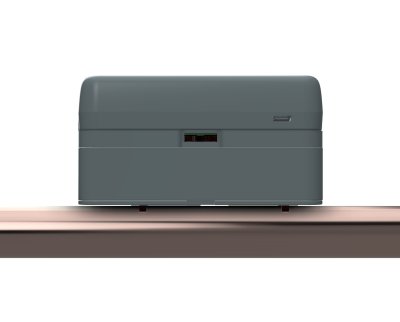
Product Description
The water sensor clamp measures flow rate and temperature in a water pipe using a "Time of Flight" measurement method and transmits the data wirelessly. Through internal flow analysis, water leaks and other anomalies are detected and the owner is alerted.
The device is clamped onto the outside of the water pipe without interrupting the water supply. The flexible design and innovative software allow use on water pipes between 16 and 50 mm with many currently available materials such as PEX, PEX AL, soft plastic-sheathed soft copper, or PE. All requirements of the European Community's Measuring Instruments Directive (MID) are met. With only 60 mm clearance above the water pipe and a length of 115 mm, the device is very flat and short, making it easy to install.
The device can be powered either via USB-C or via two AA alkaline cells. Whenever an external power source is present, it is used regardless of any inserted batteries.
The system communicates via WLAN and is controlled through an app on the mobile phone. Additionally, data can be sent to an MQTT server or an HTTP webhook for integration into a smart home system.
Measurement Principle
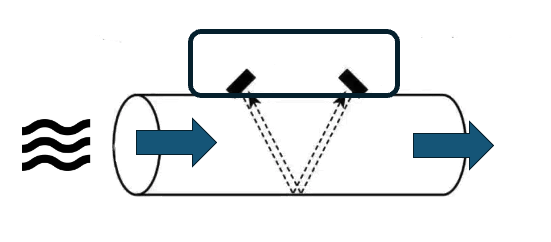
The water sensor clamp uses ultrasonic waves and the "Differential Time of Flight (DTOF)" method to measure water flow. In this method, two ultrasonic transducers are used to send signals in opposite directions through the pipe and the water. The signal sent by the upstream transducer travels along the water flow direction and is captured by the downstream transducer. The second signal, sent by the downstream transducer, travels against the water flow direction, progresses more slowly, and arrives later at the upstream transducer. The difference in transit time between the two signals is directly proportional to the velocity of the water in the pipe and thus to the flow rate.
To better understand this method, think of it like swimming in a river current. By swimming upstream and downstream and comparing the time needed to cover the same distance in each direction, you can estimate the speed of the water flow in the river.
The test signal of the device has a frequency of 1 MHz and is of very low power, making it inaudible and harmless to humans and animals. Furthermore, sound waves at this high frequency are strongly attenuated by atmospheric air pressure and cannot practically radiate beyond the pipe. The water sensor clamp will therefore not disturb people or other devices.
Sensor Construction
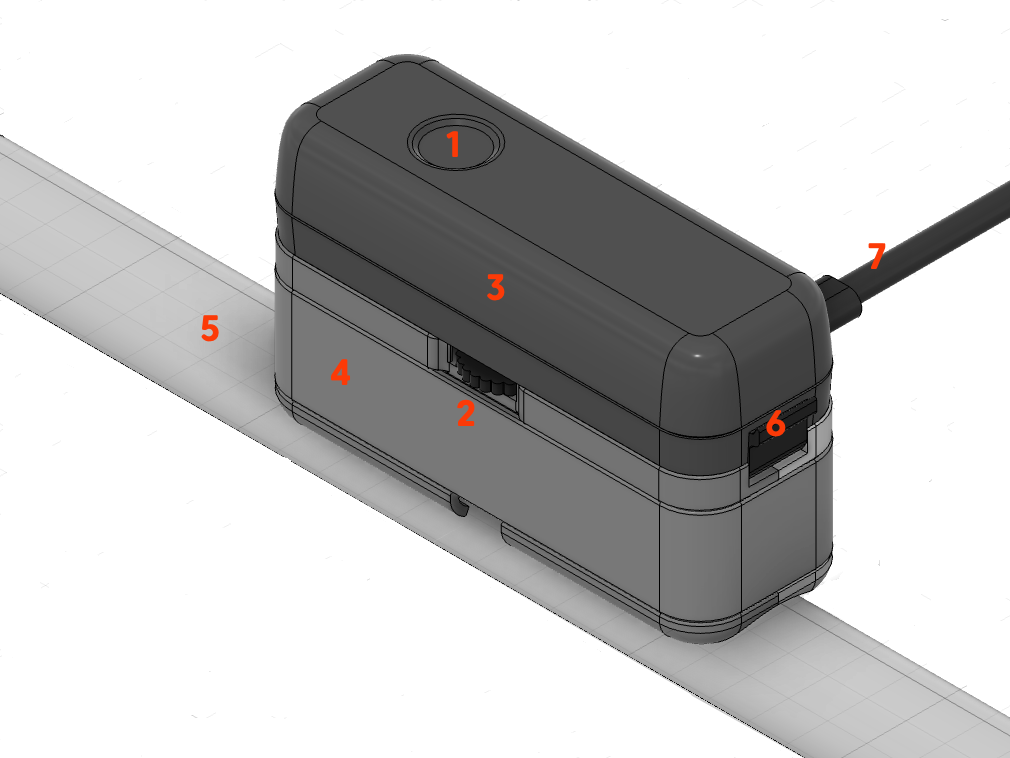
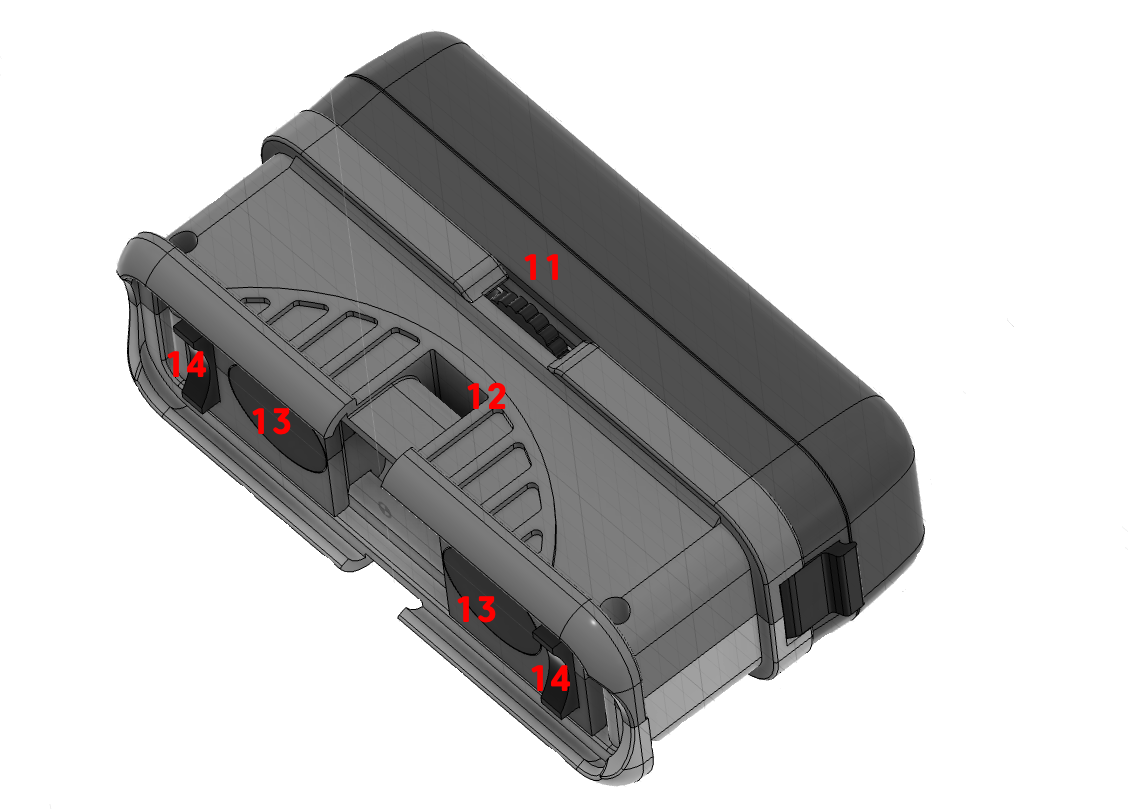
The sensor consists of two main components:
- Sensor Base (4): Connects to the water pipe. It contains the temperature sensor and the two ultrasonic transducers (13). Their spacing can be adjusted using the thumb wheel (2/11) to match the existing pipe diameter (5) and material.
- Electronics Capsule (3): Contains electronics, batteries, LED (1), button (1), etc. It is placed onto the sensor base and secured with a latch (6). As an alternative to batteries, the sensor can be powered via a USB-C power adapter (7).
To fix the base to the pipe, two small intermediate adapters (14) are needed that match the exact diameter of the water pipe. A selection for common pipe diameters is included with the product. Additionally, the sensor must be firmly mounted to the water pipe using a cable tie or alternatively a hose clamp.
During operation, the capsule is firmly connected to the base. For maintenance or battery replacement, it can be safely separated from the base. If the capsule is powered without the base, a corresponding alarm message is generated and water consumption measurement is not possible.
Connection and Communication
The WLAN setup is performed via the device's configuration page (SSID "Scope"). A detailed step-by-step guide can be found at WLAN Connection.
For Advanced Users
In addition to the Aqua-Scope app, further communication options are available and can be activated via Configuration -> Communication Options in the app:
- MQTT -- Integration into MQTT-based systems
- Home Assistant -- Automatic discovery in the dashboard
- JSON Webhook -- Custom web service with HTTP POST
- Modbus IP -- Industrial protocol (TCP Port 502)
- Local Web Server -- Direct access via browser on the LAN
The local web server and Modbus IP are only available in mains-powered mode, not in battery mode.
Installation
The installation location and proper attachment of the sensor to the pipe have a critical influence on measurement accuracy. An unfavorable installation location or improper attachment of the sensor can, in extreme cases, result in the sensor providing no measurement results at all.
Finding a Suitable Installation Location
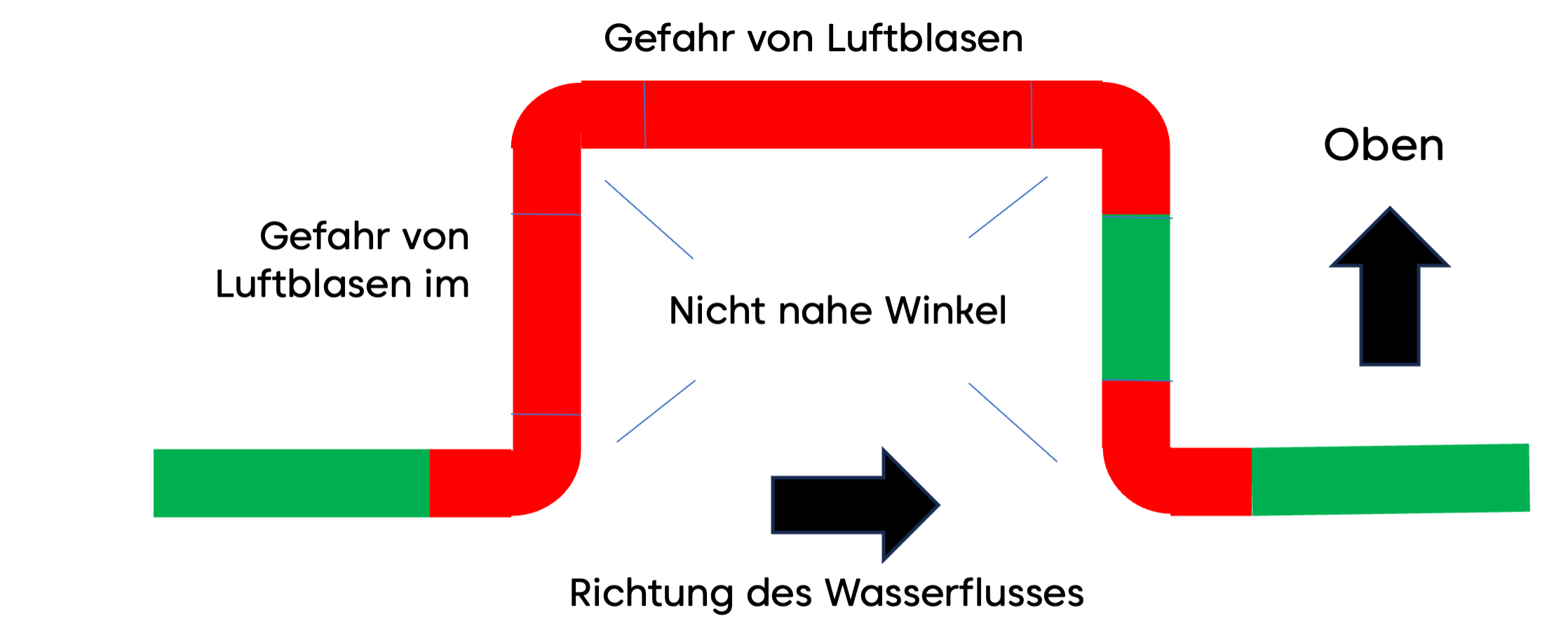
(1) For accurate measurement, the water must be free of turbulence and air bubbles. Therefore, the device must not be installed near pipe bends or other water fittings such as main shut-off valves, backflow preventers, or pressure reducers. A minimum distance of 20 cm must be maintained on each side of pipe bends, etc., and the installation point must not allow the accumulation of small air bubbles that always occur when water flows rapidly through the pipe.
(2) The pipe at the installation location must be smooth and rust-free so that no air pockets on the outside interfere with the measurement method. For plastic pipes, cleaning the surface is sufficient; for metal pipes, it may be advisable to polish them with fine sandpaper.
(3) Last but not least, the installation location must be reachable by radio. A stable wireless connection is most easily tested by connecting the sensor to the wireless network before the final installation.
- Clean, rust-free pipe
- Min. 20 cm distance from bends and fittings
- Not on descending pipes
- Wireless network coverage
Preparing the Sensor for Installation
It is recommended to connect the sensor to the wireless network at the installation location but before the final mounting on the water pipe. However, this is not a prerequisite for installation.
- From the set of spacer pieces, select the two pieces matching the pipe diameter and insert them next to the transducers in the corresponding slots.
- The transducers on the sensor base can be moved using the small thumb wheel on the side and can thus be adapted to different pipe diameters and materials. The transducers can be spread up to 26 mm apart. Table 1 shows the required distance in millimeters for various pipe diameters and materials. If the pipe is sheathed (e.g., PEX with aluminum sheathing or copper with plastic sheathing), select the base material from the table. The distance should be set with an accuracy of +/- 2 mm.
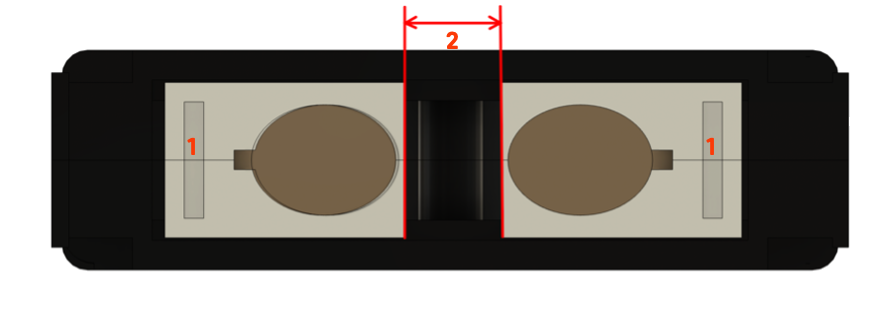
| Diameter | 20 mm | 26 mm | 33 mm | 42 mm | 56 mm |
|---|---|---|---|---|---|
| Soft copper | 0 mm | 0 mm | 5 mm | 13 mm | 20 mm |
| PEX | 0 mm | 0 mm | 5 mm | 20 mm | 20 cm |
| PP | 0 mm | 0 mm | 5 mm | 15 mm | 18 mm |
Table 1: Transducer distances depending on the water pipe used
- The contact pads are adhered to the transducers. First, peel off the white protective film and place the adhesive pad directly over the transducer surface. The adhesive pad should be flush with the side of the housing facing the other transducer. Remove the red protective films on the transducer contact pads. The buffer pads are very sticky and will hold the sensor to the pipe even without further fixation. Initially, press the pads only very lightly so they can be removed again if needed. If you damage one or both pads during removal, replacement pads are included with the product.
- Observing the flow direction (large arrow on the device's nameplate), place the sensor against the water pipe and loosely secure it with the cable tie.
- Set the transducer distance
- Do not press the contact pads too firmly
- Observe the water flow direction
Attaching the Sensor to the Pipe
The precise positioning of the sensor on the pipe has a critical influence on the functionality and accuracy of the device. The following must be observed:
- The sensor must be placed absolutely parallel to the pipe. The spacer pieces help achieve exactly this.
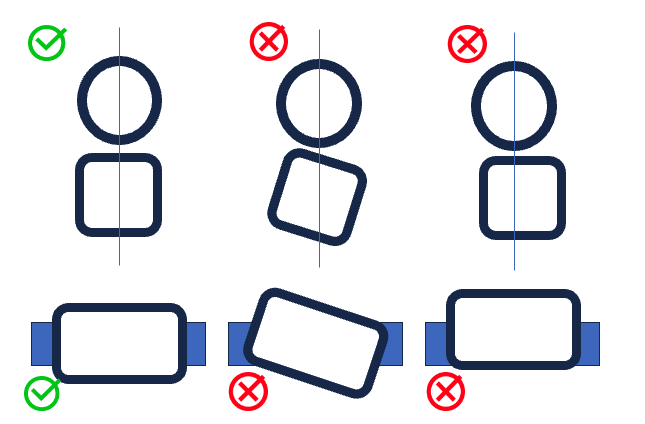
- The sensor should be mounted on the side of the pipe. Air bubbles can collect at the top of the pipe, and deposits may be present at the bottom.
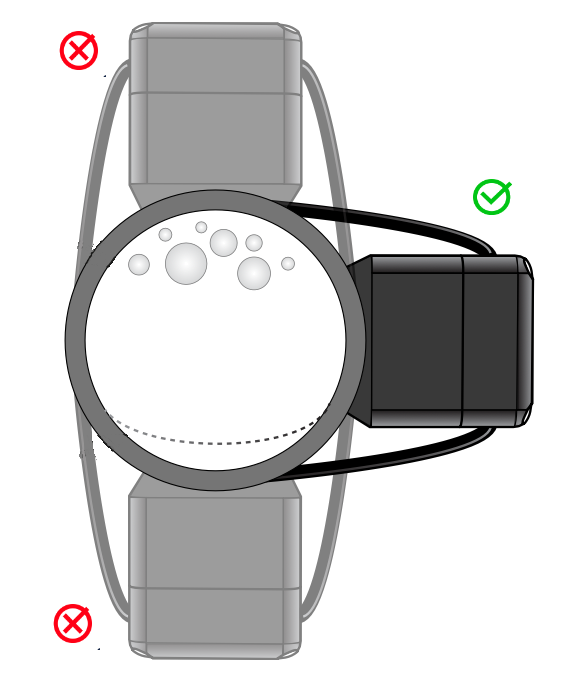
- The sensor must have a defined distance to the pipe, completely filled by the contact buffers. The spacer pieces also help achieve exactly this.
- The contact pressure of the sensor must be optimal. This needs to be optimized during installation itself. A positioning aid is available for this purpose if needed.
Secure the sensor with the included cable tie. The cable tie must be pulled as tight as possible. Then power the sensor. Once it has connected to the wireless network, the LED will either blink slowly red or slowly green:
- Slow green (every 5 seconds): Device is ready for operation.
- Slow red: Positioning must be optimized.
Always mount the sensor on the side of the pipe, not on top or bottom. This improves measurement accuracy and prevents deposits on the transducers.
Positioning Aid
The sensor has a built-in positioning aid that helps you:
- find the optimal position on the pipe
- set the optimal contact pressure of the sensor
- find the optimal distance between the transducers
- correct tilted or twisted placement of the sensor
The positioning aid is started with three clicks on the button and works like parking sensors on a car. The LED blinks red-yellow with varying proportions of red and yellow, later red and green. Additionally, the sensor beeps slower or faster.
The rule is: the more green and the faster the beeping, the better. No green means no working position.
You must now try to find a working position by changing the contact pressure or, if necessary, adjusting the transducer distance or the sensor position. As soon as the LED shows at least some green, you can end the process with a short click on the button. A post-calibration of approximately 30 seconds follows. During this time, the sensor blinks yellow. If no acceptable position is reached, the sensor returns to the red blinking mode. Measurement of water consumption is not yet possible. You can repeat the positioning at any time or use it during operation by pressing and holding the button for three seconds to check the optimal sensor fit.
Why does the positioning aid fail?
- No water in the pipe or too many air bubbles in the pipe: Find a position farther away from bends or downward-leading pipes.
- No water pressure in the pipe.
- Contaminated pipe surface: Please remove rust using the included sandpaper; you may also degrease the pipe or use the included ultrasonic gel for a better connection between the sensor and pipe.
- Insufficient contact pressure of the sensor against the pipe. This can lead to malfunction especially with metal pipes (copper or iron). Consider using a pipe clamp instead of the more convenient cable tie.
Calibration
Immediately after positioning, a basic calibration of the system is performed. The LED on the device blinks yellow for approximately one minute. During this time:
- the device must be mounted on the pipe,
- there must be water in the pipe,
- no water must be flowing.
After successful calibration, the green LED will briefly light up every 5 seconds in mains-powered mode, and in battery mode the LED will be completely off.
Ensure that no water is flowing during the calibration phase. Any water usage during this time will lead to inaccurate measurements.
On-Device Operation
Operating States
The sensor can be in various operating states depending on the status of its network connection, the calibration of the measurement system, or a detected alarm. Each state is indicated by a specific LED blinking sequence.
(1) Red/yellow/green alternating every 200 ms (fast): The sensor is booting after power-on or reset and is searching for a network connection.
(2) Red/green alternating every second (slow): The sensor has no configured network connection yet and is waiting for the network connection setup.
(3) Red/green every 100 ms (fast): The sensor is in WPS mode for quick connection to a WLAN network.
If none of these three LED combinations are visible, the sensor is connected to the network. It is then either in normal operating mode, alarm mode, or not yet calibrated. It is therefore not possible to calibrate the sensor on the water pipe as long as no network connection has been established.
(4) Red blinking every second (slow): The sensor has not yet been successfully calibrated. It will therefore only transmit temperature values but no consumption data. It must be calibrated. In this state, no alarms are activated.
(5) Red/green alternating with varying green and red phase lengths: Feedback during calibration and positioning of the system.
(6) Yellow every second (slow): Calibration after positioning.
After successful calibration and with an existing network connection, two possible operating states result. If the sensor has not yet been calibrated but is successfully mounted on a water pipe and receives a clean test signal, the calibration phase is skipped and the sensor automatically enters normal operating mode.
(7) Green flash every 5 seconds: The sensor is calibrated and operating normally. Temperature and consumption values are regularly transmitted along with all alarms. When water is flowing, the green LED blinks faster.
(8) Red flash every 5 seconds: The sensor is calibrated and operating normally, but an alarm is active. The reason for the alarm is transmitted via the network. If the reason for an alarm disappears, the alarm is cleared. An alarm can also be cleared via the local button, even if the alarm condition has not disappeared. The corresponding alarm reason then remains deactivated until the next boot (power-on or reboot).
| # | State | Start | End |
|---|---|---|---|
| 1 | Boot | After power-on or reset | Automatically to (2) or (4) or (7), depending on network availability and/or calibration |
| 2 | Searching for network | Automatically from (1) | Successful network connection |
| 3 | WPS | Single click during (2) | Single click, back to (2) |
| 4 | Uncalibrated | Network successfully connected | Triple click to (5) |
| 5 | Positioning | Triple click in (4) | Single click to (6) |
| 6 | Calibration | Single click in (5) | Ends automatically after 30 seconds |
| 7 | Normal | End of (6) or (1) or (2) | Alarm |
| 8 | Alarm | Alarm | Double click clears alarm |
LED Signals
| LED Signal | Meaning |
|---|---|
| Red short | Alarm active |
| Red long | Normal but not calibrated |
| Yellow long | Calibration |
| Green short | Normal |
| Green fast | Water flowing |
| Red/green fast | WPS active |
| Red/green slow | Searching for network |
| Red/green variable with beep | Positioning |
| Red/yellow/green | Booting |
Button Operation
| Action | Function |
|---|---|
| Single click | During positioning: stop positioning. During normal operation: send status report to network |
| Double click | Clear alarm |
| Triple click | Start positioning plus calibration |
| Hold button 3 sec. | Start positioning without calibration |
| 10x click | Reset to factory state |
Beeper
| Signal | Meaning |
|---|---|
| Triple short beep | OK |
| Approx. 3 seconds long | Error |
| Variable length | Sensor positioning |
Wireless Device Usage
Communication Options
When the device is connected to the local WLAN, its functions can be used via various communication methods (also simultaneously):
-
App on mobile phone, PC, tablet: The Aqua-Scope app is a so-called PWA (Progressive Web App). Open the website https://app.aqua-scope.com in the system browser (Chrome on Android or Safari on iOS). You can use almost all app functions in the normal browser.
- Android will offer after a short time to install the app as a native app on the device. Please confirm the offer and a native app will be installed on your home screen.
- iOS: A shortcut of the website must be added to the home screen. Select the share icon in Safari to open the shortcut dialog. Here, choose the option "Add to Home Screen". A normal app icon will then appear on the home screen. You may need to log out and log back in to the app so that iOS asks whether push notifications should be allowed.
-
MQTT Server: If configured accordingly, status information from the sensor is sent to the configured MQTT server. The MQTT service must be activated and your own MQTT server/port/login must be stored in the device.
-
Custom Web Service (Webhook): Most smart home gateways allow the reception and display of sensor data via plugins using so-called "webhooks".
Sensor Data and Notifications
The Aqua-Scope app displays:
- the temperature history (measured directly next to the transducers),
- the consumption within an interval (15 minutes in mains-powered mode and 60 minutes in battery mode),
- the current battery status values in battery mode.
Furthermore, a wide range of alarm messages are displayed directly in the app, via email, and/or push notification. In the app under "Configuration -> Alarm Notifications", you can set whether and how a specific alarm should be displayed and reported. In mains-powered mode, alarms are additionally indicated directly on the device by a red blinking LED and an audible signal.
Directly on the device, an alarm can also be cleared by clicking the button, even if the alarm condition has not disappeared. Otherwise, the alarm is automatically reset when the alarm condition or the fault to be reported no longer occurs. Cleared alarms are shown in the app's event history.
Alarm Messages and Their Causes
When an alarm condition occurs, the alarm is shown locally on the device by red blinking and transmitted via radio and displayed in the app. If the alarm condition disappears, it is automatically cleared. An alarm can also be cleared directly on the device by pressing the button. The cleared alarm will then not be triggered again for at least one hour, even if the alarm condition would require it.
- Prolonged Water Usage: Water has been flowing for a very long time. The threshold is set to 15 minutes by default and can be adjusted in the app under "Configuration". The alarm is automatically cleared when water consumption stops.
- Excessive Water Usage: This usually indicates a pipe burst. The water flow is constantly higher than the threshold allows over a period of one minute. The threshold is set to 28 liters/minute by default and can be adjusted in the app under "Configuration". If the flow intensity drops below the threshold or stops, this alarm is automatically cleared.
- No Water Flow at All: If no water is used over an extended period (threshold is 30 days), the water should be shut off and the pipes drained, or water should be run regularly (e.g., flushing the toilet) to prevent the pipes from being damaged and destroyed by standing water. The alarm is cleared when either water usage is detected again or no water is detected in the pipe.
- Temperature Outside Permitted Range: The alarm is triggered when the water temperature moves outside a permitted range. The factory setting is 5 to 40 degrees Celsius. The thresholds can be adjusted in the app.
- Reverse Water Flow: Modern installations, such as legally required backflow preventers, should make it impossible for water to flow backward into the supply line. If this does occur, a plumber should investigate. The alarm is triggered when water flows in the wrong direction consistently for a period of 30 seconds. The alarm is cleared when no flow or normal flow is detected.
- No Water in Pipe: This is quite possible when the water is shut off, e.g., during repair work. The sensor can then no longer operate. Permanent air bubbles in the pipe are also possible. Observe the installation conditions.
- Battery Low: The battery is running low and needs to be replaced. This message is also generated when no battery is inserted at device startup. Unlike other alarm types, this alarm is NOT indicated locally by a red LED.
- Stuck Toilet Flush: A stuck toilet flush will not cause damage but will waste water unnecessarily. A stuck flush produces a very characteristic consumption pattern and can be easily detected. The problem is usually resolved by pressing the toilet flush button. The alarm is cleared when no stuck condition is detected.
- Dripping Faucet: Any water usage above the measurement uncertainty and below normal water usage is detected as a dripping faucet. If the water flows at such a minimal rate for a period of at least one hour, an alarm is triggered. The cause of such an alarm could also be a small leak in a water line (micro-leak). Therefore, the issue should be investigated and the cause resolved.
- Tampering Attempt on Device: This alarm is always triggered when the electronics capsule is removed from the base unit. Please note that a battery change will therefore always trigger a corresponding tampering alarm.
Power Supply and Battery Operation
The device can be powered either via a USB-C power adapter (included in the delivery) or via two standard AA batteries. In the factory state, no batteries are inserted.
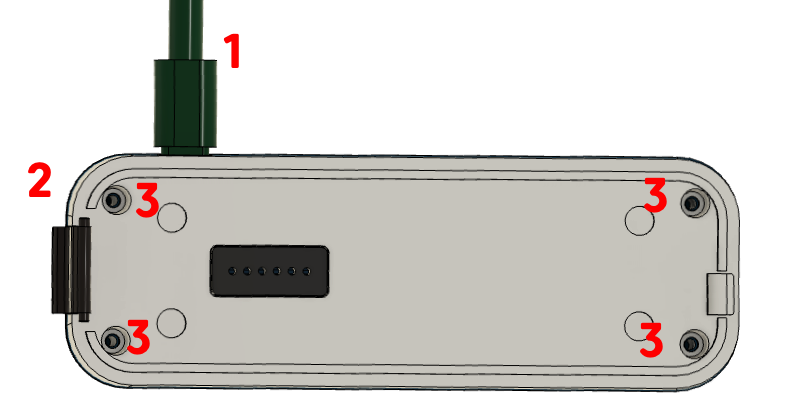
To use the device with batteries, the battery compartment must be opened:
- Disconnect the device from the power supply.
- Separate the electronics capsule from the sensor base.
- Loosen all four screws and remove the cover from the electronics capsule.
After inserting two AA batteries (1.5 V alkaline), replace the cover and secure it with the four screws. At this point, the red LED will blink, indicating an alarm because the electronics capsule was separated from the sensor base. Once the electronics capsule is placed back on the sensor base, the alarm is automatically cleared.
Whenever an external power source is present, it is used regardless of any inserted batteries. The batteries then serve as a backup in case of power supply interruption.
In battery mode, the LEDs on the device are disabled -- functionality is otherwise completely identical. The following changes apply in battery mode:
- In normal operation, the LED is off.
- In alarm mode, the LED and buzzer are only briefly active at longer intervals.
- Individual water usage events are not reported.
- Total consumption is only transmitted hourly.
- The minimum detection threshold for dripping faucets is slightly increased.
All other device functions such as leak detection, drip detection, etc. continue to operate.
Technical Specifications
Part 1
| Parameter | Value |
|---|---|
| SKU | AQMWIE01 |
| EAN | 4251295783-444 |
| Power Supply | |
| Operating modes | Alternatively or simultaneously: ext. power adapter or battery |
| Power adapter | 5V/2A USB-C |
| Battery | 2 x AA, replaceable |
| Communication | |
| WLAN | IEEE 802.11b/g/n (2.4 GHz) |
| WLAN protocols | Aqua-Scope Cloud, MQTT Client, JSON Webservice Client |
| LoRaWAN | EU868 (or as configured), Class A, LoRaWAN 1.0.3 |
| Bluetooth | 5 LE, UART Profile |
| Controls | |
| Buttons | One button |
| LEDs | 3-color (red/green/yellow) |
| Sensor Technology | |
| Method | Differential Time-of-Flight (DTOF) |
| Measurement frequency | 1 MHz ultrasonic |
| Signal strength | -7.5 ... 30 dB (calibratable) |
| Supported Pipes | |
| Diameter | 15--56 mm |
| Materials | PEX, PEX AL, soft copper, PP, PE |
| Detection Thresholds | |
| Minimum sensitivity | 1--3 l/min (adjustable) |
| Drip detection | from 0.1 l/min (calibration dependent) |
| Pipe burst detection | > 30 l/min (configurable) |
| Dimensions/Weight | |
| Dimensions | 110 x 60 x 40 mm |
| Weight | 310 g (without batteries) |
| Protection rating | IP44 |
| Storage/transport | 0--40 °C, 10--90 % RH |
Part 2 (per MID/OIML-R49)
| Parameter | Value |
|---|---|
| Pressure | PN10 (pipe dependent) |
| Water temperature | 0.1 °C ... 70 °C (T70) |
| Overload flow rate (Q4) | 3 125 l/h |
| Electromagnetic class | E1 (residential, commercial, light industrial) |
| Climatic class | 5 °C ... 30 °C in condensating/damp environment |
| Environmental class | B (MID), fixed installation with minimal vibrations |
Technical Support and Contact Information
Should you experience problems with this product, please give us the opportunity to resolve the issue together with you before returning the product to us or your dealer.
- Phone (German-speaking): +49 375 472 14208
- Email: info@aqua-scope.com
- Website: www.aqua-scope.com