AQSWIE02 -- Leak Protection Monitor (WLAN)
Product Description
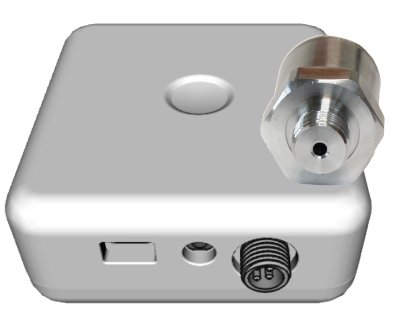
The device combines leak protection with pressure and temperature monitoring. It consists of two components:
- Main unit for signal processing and wireless communication with battery compartment
- External sensor head with connection to the water supply line
The system communicates via WLAN with the Aqua-Scope Cloud app or via MQTT/JSON to custom servers. Power is supplied via a USB-C power adapter or an optional internal ER26500 battery. Both the sensor head (IP67) and the main unit (IP65) are waterproof.
Key Features:
- Pressure wave analysis for leak detection
- External sensor head with G1/4" connection
- T-piece for 3/8" angle valves included
- Wired flood sensor (3.5 mm jack socket)
- Retrofit motor support via LoRa (auto shut-off)
- Up to 10 wireless flood sensors
- App + MQTT + JSON Webhook
- Power supply: USB-C (5V/1A) or ER26500 battery
- Protection rating: IP65 (main unit) / IP67 (sensor head)
Installation
The sensor head has a G1/4" thread (European metric) and therefore fits all test ports in the water supply network, e.g., on backflow preventers, main shut-off valves, or pressure reducers.
Installation at a Test Port
Screw the sensor head directly into an existing 1/4" test port.
Installation at an Angle Valve
If no test port is available, the sensor head can be installed at an angle valve:

- Shut off the water at the angle valve
- Loosen the braided hose at the angle valve using the included 3/8" open-end wrench
- Insert the included T-piece between the angle valve and the braided hose
- Reattach the braided hose to the T-piece
- Screw the sensor head into the outlet of the T-piece
- Turn the water back on and check all connections for leaks
When reattaching the braided hose, always brace the braided hose to prevent it from twisting. A twisted braided hose can lead to leaks!
The sensor head must always be installed after any existing pressure reducer. Only then can the device work correctly and reliably detect leaks.
Connection and Communication
The WLAN setup is performed via the device's configuration page (SSID "Scope"). A detailed step-by-step guide can be found at WLAN Connection.
For Advanced Users
In addition to the Aqua-Scope app, further communication options are available and can be activated via Configuration -> Communication Options in the app:
- MQTT -- Integration into MQTT-based systems
- Home Assistant -- Automatic discovery in the dashboard
- JSON Webhook -- Custom web service with HTTP POST
- Modbus IP -- Industrial protocol (TCP Port 502)
- Local Web Server -- Direct access via browser on the LAN
The local web server and Modbus IP are only available in mains-powered mode, not in battery mode.
Device Usage
Hardware
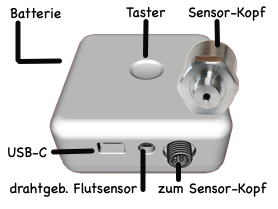
- USB-C Port: For power supply only (included KTEC power adapter recommended -- cheaper alternatives may cause interference that affects sensor quality). Waterproof connector.
- External Sensor Head: Waterproof threaded connection to the main unit (80 cm cable)
- 3.5 mm Jack Socket: Waterproof connection for an additional external flood sensor (included)
- Battery Compartment (rear): Screw cap with rubber seal for water protection
Button Operation
| Action | Function |
|---|---|
| Press once briefly | Wake up / send status report |
| Press twice briefly | Acknowledge active alarm (alarm is suppressed until the next restart) |
| Press three times briefly | Currently not assigned |
| Hold for 5 sec. (immediately after power-on) | Factory reset (LED blinks 4x red as counting aid, then 3x short red as confirmation) |
In battery mode, the button must be held for approx. 1 second to wake up the device. In battery mode, 120 seconds are available for the WLAN connection before sleep mode is activated.
LED Indicators
| LED | Meaning |
|---|---|
| Yellow/multicolor blinking | Boot process |
| Red/green blinking | Factory state -- ready to connect, web server and Bluetooth active |
| Blue or green slowly breathing | Network and external power connected, normal/standby operation |
| Red blinking | Active alarm with external power |
| Off | Not connected or battery mode (sleep mode) |
Measurements and Alarms
The device measures water pressure and temperature multiple times per second and transmits the data every 15 minutes via WLAN (including uptime, battery consumption, and battery voltage).
The following conditions trigger an immediate alarm:
| Alarm Type | Mask | Description |
|---|---|---|
| 1 -- Flood Sensor | 0x001 | Wired or wireless sensor detects water (indicates nearby leak) |
| 4 -- Underpressure | 0x008 | Water pressure below lower threshold (Parameter 7, default: 1 mBar) -- possible pipe burst or shut-off |
| 6 -- Overpressure | 0x020 | Water pressure above upper threshold (Parameter 6, default: 8000 mBar) -- pressure reducer malfunction |
| 8 -- Pipe Check Micro-Leak | 0x080 | Pipe check detected a micro-leak |
| 14 -- Sensor Not Connected | 0x2000 | Sensor head disconnected from main unit |
| 15 -- Sensor Not in Water | 0x4000 | Sensor head connected but no contact with pressurized water |
| Temperature | -- | Water temperature exceeds maximum (Parameter 16) or falls below minimum (Parameter 11) |
Alarms are delivered via the app with push notifications and optional email/voice forwarding. They are automatically cleared when the condition normalizes. A double button press suppresses alarms until the next power-on.
Communication with External Devices
The monitor operates independently but achieves its full functionality with peripheral devices:
Retrofit Motors: Aqua-Scope offers retrofit motors for various shut-off valve types. These are installed directly on the valve -- without interrupting the water supply or cutting into the pipe. Communication takes place via the internal LoRa system (works even through difficult obstacles such as basements). Pairing is done via the app under "New Sub-Device" by entering the 16-digit QR code/device ID.
Motor functions:
- Direct control via app buttons ("OPEN"/"CLOSE")
- Configurable timers for automatic switching at specific times/days of the week
- Automatic pipe check
- Auto shut-off on leak or alarm (configurable)
- Direct manual control via device button
Wireless Sensors: Up to 9 additional wireless external flood sensors protect areas such as sinks. Pairing is also done via "New Sub-Device" -- the app automatically recognizes the device type.
Pipe Check
The pipe check detects micro-leaks in the water system. To do this, the motor shuts off the water for approx. 240 seconds and the pressure change in the water system is analyzed. Temperature fluctuations, outgassing, and also micro-leaks affect the measurement.
The sensitivity is very high -- a leak is detected from approx. 1 drop per second (sensitivity: <4 ml/hour). The sensitivity can be adjusted in the app.
The threshold must be set higher if a larger hot water tank (boiler) is present, as the thermal expansion of the water affects the pressure measurement.
Alarm Behavior: In the factory settings, only the 5th consecutive alarm leads to an actual notification of the user, as the detected micro-leak is usually a dripping faucet. This value can be changed in the app from 0 (alarm immediately) to 10.
Manual and Automatic Pipe Check:
The pipe check can be manually started in the app. However, it is recommended to perform it regularly and automatically. To do this, a timed action "Pipe Check" is defined in the app with:
- Freely selectable time of day
- Freely selectable days of the week (multiple possible)
A retrofit motor (e.g., BVSLWE02 or KFRLWE02) is required for the pipe check to automatically shut off the water before the test.
Micro-leak does not mean panic -- it is usually a dripping faucet. If the message persists for several days, an investigation should be carried out. The alarm messages provide clues about the location.
Battery Operation
The device is powered by an ER26500 battery (bobbin cell, size C, lithium thionyl chloride), which is inserted in the battery compartment on the back.
- Battery life: 8--10 years with pressure reducer, approx. 4 years without
- The battery can also serve as a backup alongside mains power (USB-C)
- The power source at startup determines the operating mode: when mains power is present, the device remains in mains mode until the next status report (default: 15 min.), even if power is lost with a battery inserted
In pure battery mode:
- LEDs on the device are disabled (status LED remains dark)
- No acoustic or visual local alarm indication
- Slow command processing (up to 1 hour instead of ~10 seconds in mains mode)
- Cannot receive alarms from external wireless flood sensors
- Sensor data is transmitted hourly instead of every 15 minutes
- LoRaWAN devices attempt JOIN only once
Configuration Parameters
| No. | Parameter | Default | Description |
|---|---|---|---|
| 4 | Valve motor action | -- | Bitmap: defines which alarm types trigger motor shut-off |
| 5 | Nominal pressure | -- | Informational: set pressure of the pressure reducer (mBar) |
| 6 | Overpressure threshold | 8000 mBar | Alarm when the measurement exceeds the set value 60 times (sampling rate factory set to 1 s, configurable) |
| 7 | Underpressure threshold | 1 mBar | Alarm when the measurement falls below the set value 60 times (sampling rate factory set to 1 s, configurable) |
| 13 | Pipe check duration | 240 s | Test duration for micro-leak detection |
| 14 | Pipe check abort | 200 mBar | Single pressure increase that aborts the test (e.g., hot water heating) |
| 15 | Pipe check alarm | 30 mBar | Pressure drop threshold for leak detection |
| 18 | Temperature sensor offset | 0 | Linear offset in 1/10 °C |
Sensor Values
| Index | Modbus Register | Measurement | Unit |
|---|---|---|---|
| 0 | 100/101 | Uptime | Hours |
| 1 | 102/103 | Temperature | 1/10 °C |
| 2 | 104/105 | Battery voltage | mV |
| 3 | 106/107 | Battery consumption | mAs |
| 4 | 108/109 | Water pressure | mBar |
| 5 | 110/111 | Valve status | 1=open, 0=closed |
Scope of Delivery
- Leak protection monitor (main unit, without battery)
- Aqua-Scope sensor head with 80 cm cable
- 3/8" T-piece for angle valve installation
- Flood sensor with 130 cm cable and jack plug
- USB-C power cable and power adapter
- 19 mm wrench for T-piece installation
EU Drinking Water Directive 98/83/EC
The T-piece with drinking water contact complies with European standards. Material: CW509L, listed in the German Federal Environment Agency (UBA) register of approved materials (edition May 14, 2020, section 2.1.3.1).
Technical Specifications
| Parameter | Value |
|---|---|
| SKU | AQSWIE02 |
| Power supply | USB-C 5V/1A (external) |
| Battery | Bobbin Cell C ER26500 (lithium thionyl chloride) |
| Processor | ESP32-WROOM_32E (Xtensa Dual Core 32-bit, 240 MHz, 520 KB RAM) |
| WLAN | IEEE 802.11 b/g/n (2.4 GHz) -- Aqua-Scope Cloud, MQTT, JSON |
| Bluetooth | 5 LE (UART profile) |
| Pressure sensor | 0--10 bar (0--1000 kPa), overload 150% |
| Connection | G1/4" internal thread, I2C |
| Accuracy | <1% dynamic |
| Temperature sensor | Integrated in sensor head |
| Dimensions (main unit) | 91 x 91 x 30 mm |
| Weight (main unit) | 105 g |
| Weight (sensor head) | 140 g |
| Protection rating | IP65 (main unit) / IP67 (sensor head) |
| Controls | 3-color LED, single button |
| Operating temperature | -20 to +50 °C |
| Storage/transport temperature | -65 to +125 °C |
| Relative humidity | 0--90% |
| Pipe check sensitivity | <4 ml/hour |
| Radio emissions (WLAN) | 2.4 GHz broadband (EN 300 328) |
| Radio emissions (LoRa) | 868--869 MHz, 4 dBm (2.5 mW) |